Iceberg Advanced
v.2.1.1.0 Market depth Real time
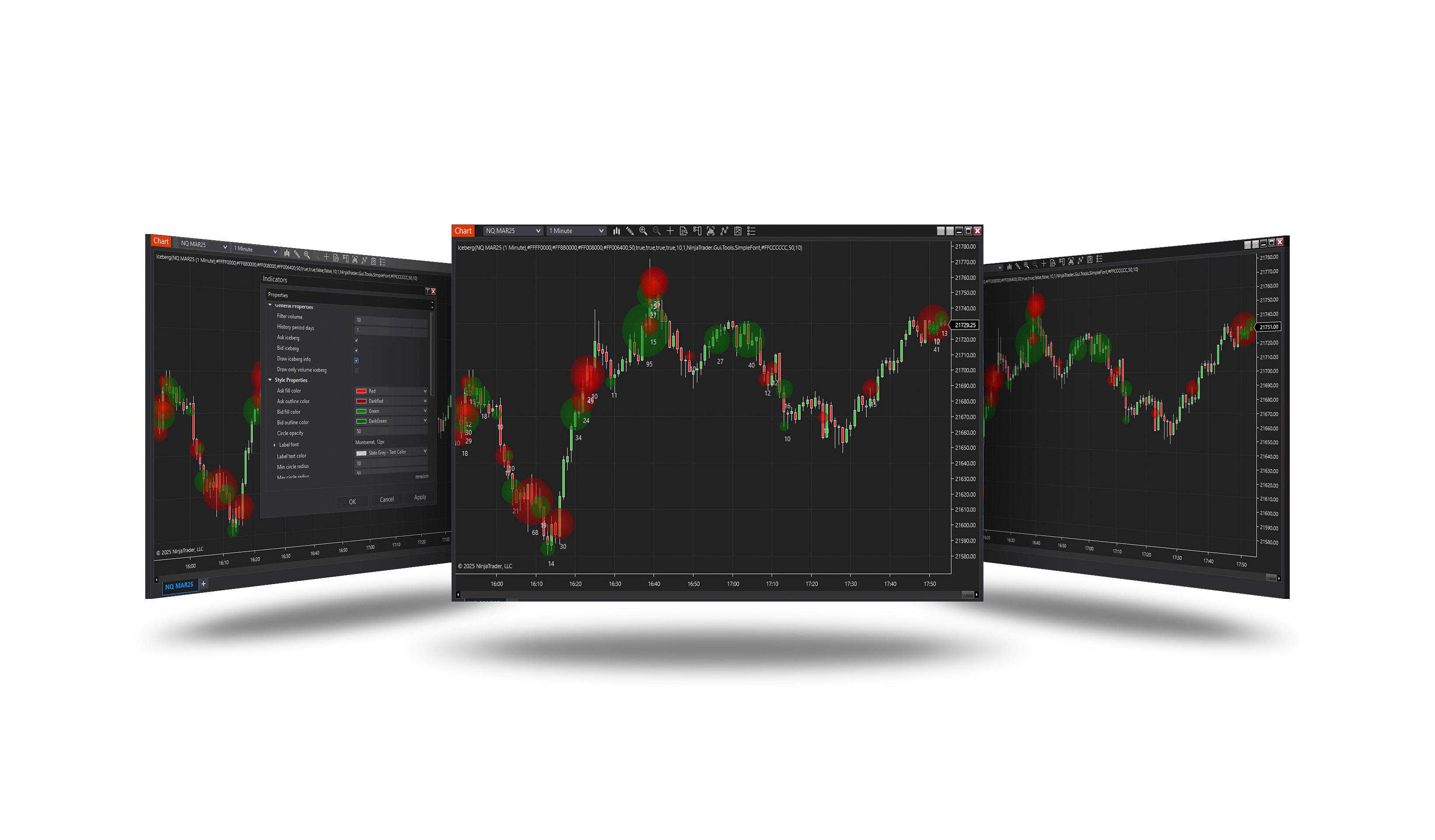
Overview
Detects iceberg orders - large orders that show only a small part of their size. A level that keeps being refilled after it is traded into is an iceberg; the volume that arrives on the refills is its hidden part. Each iceberg is drawn as a bloom whose rings count the refills, with its hidden volume, and a panel tracks the hidden delta.
How it works
- Watches the order book levels around the price.
- A level refilled after being traded into, at least Min refills times with at least Filter volume, is an iceberg.
- Ask icebergs are red, bid icebergs green; significant ones are highlighted as resistance / support.
Parameters
General Properties
| Parameter | Default | What it does |
|---|---|---|
| Filter volume | 100 | Minimum hidden volume an iceberg must accumulate before it is drawn. |
| Min refills | 2 | How many times a level must be refilled after being traded into before it counts as an iceberg. 1 reports every replenishment; 2 or 3 keeps only levels that are clearly being worked. |
| Remove history | On | If true, iceberg history files older than the history period are deleted and only the period is loaded. If false, history is kept indefinitely and everything within the chart's range is loaded. |
| History period days | 1 | Number of days of iceberg history to keep, today included (1 = today only). Applies only when Remove history is true; otherwise the chart's range decides what is loaded. |
| Ask iceberg | On | If true, the ask iceberg is drawn. |
| Bid iceberg | On | If true, the bid iceberg is drawn. |
| Draw iceberg info | On | If true, the label chip is drawn next to each iceberg. |
| Draw only volume iceberg | Off | If true, the label shows only the hidden volume instead of volume, price and refill count. |
| Show price shelf | On | If true, a fading line is drawn at the iceberg's price across the bars the level stayed active. |
| Reset hidden delta | On | If true, the cumulative Hidden delta plot restarts at zero at the start of every Reset period. If false, it keeps accumulating over everything loaded. |
| Reset period | Day | How often Hidden delta starts over: every session (Day), or at the first session of a new week, month or year - counted by trading day, so a Sunday evening session belongs to Monday. Longer periods show only the icebergs recorded while the indicator was running: with Remove history on, no more than History period days of them. |
| Show hidden delta panel | On | If true, a small readout in the top right corner plots the cumulative hidden delta over the most recent bars. |
| Delta panel bars | 120 | How many of the most recent bars the panel plots. |
Alerts
| Parameter | Default | What it does |
|---|---|---|
| Enable alerts | Off | If true, an alert is raised for each iceberg the indicator detects, using the same Filter volume and Min refills that decide what is drawn. One alert per level, however many times it refills after that; it reads like the marker's label (hidden @ price ×refills) as it stood at the moment of detection, while the marker on the chart keeps growing. |
| Alert sound | Alert2.wav | Sound played with the alert. The list holds the .wav files from the NinjaTrader sounds folder; a full path to a file of your own can be typed in instead. |
Style Properties
| Parameter | Default | What it does |
|---|---|---|
| Ask fill color | red | Core colour of the ask-side bloom. |
| Ask outline color | dark red | Ring, shelf and chip border colour on the ask side. |
| Bid fill color | green | Core colour of the bid-side bloom. |
| Bid outline color | dark green | Ring, shelf and chip border colour on the bid side. |
| Draw marker fill | On | If true, the bloom and the core dot are drawn. Turn it off to leave the rings on their own. |
| Draw marker outline | On | If true, the ring around the bloom is drawn. Turn it off to leave the bloom on its own. |
| Outline width | 1 | Thickness of the ring around the marker, in pixels. A significant iceberg is drawn one pixel heavier than this. |
| Highlight significant | On | If true, the biggest icebergs are drawn in the highlight colour - the levels where enough volume was replenished to be worth watching. |
| Significant threshold (%) | 70 | Share of the largest hidden volume seen so far that an iceberg must reach to be highlighted. Measured against the same maximum that sets the marker sizes, so it needs no tuning per instrument. |
| Resistance highlight color | magenta | Highlight colour for a significant ask-side iceberg - hidden selling that price has to get through from below. |
| Support highlight color | deep sky blue | Highlight colour for a significant bid-side iceberg - hidden buying that price has to break down through. |
| Circle opacity | 50 | Opacity for the bloom fill (0-100). |
| Label font | Arial 12 | Font for the iceberg label. |
| Label text color | — | Text color for the iceberg label. |
| Min circle radius | 10 | Minimum bloom radius (in pixels). |
| Max circle radius | 50 | Maximum bloom radius (in pixels). |
The hidden delta panel
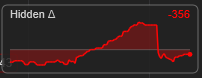
A small panel in the top right corner of the price chart. Hidden Δ is the hidden volume of the bid icebergs minus that of the ask icebergs, added up since the last reset (Reset period); the number on the right is its current value.
The curve shows it over the last Delta panel bars bars against the zero line. Above zero and green - the hidden buying at the bid outweighs the hidden selling; below zero and red - the reverse. The panel follows the bar the chart is scrolled to.
Requirements
- Market depth (Level II) data; works in real time and in Playback with market depth.
- Found icebergs are stored, so a chart opened later still shows them.
Version history
v.2.1.1.0 - October 2026
- Changed: detection from the refills of the order book; history kept between sessions; hidden delta panel; alerts.
- Changed: the panel kept clear of the arrow on the price scale.