Spread Indicator
v.2.3.5.0
Overview
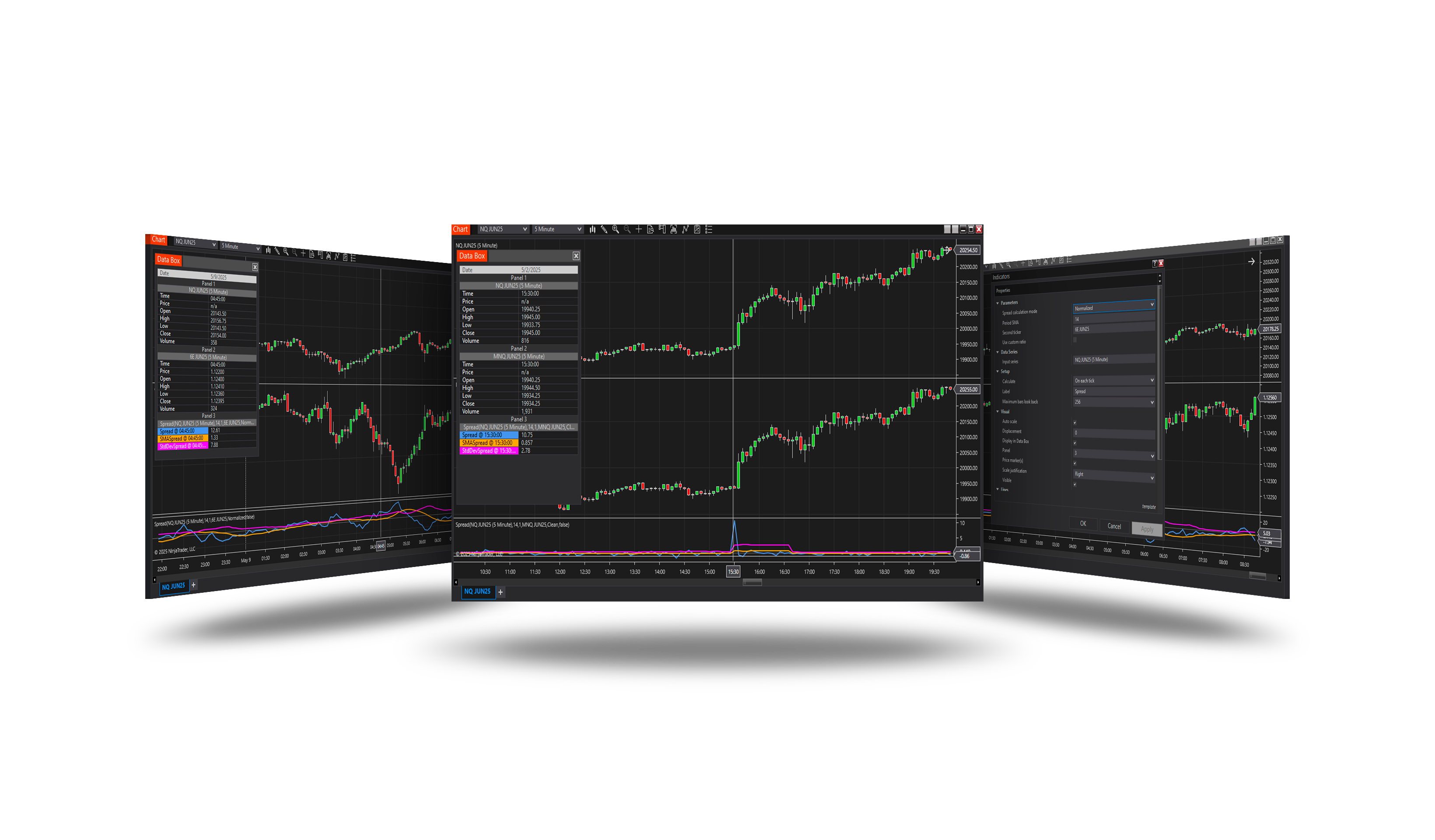
The spread between the chart's instrument and a second one (optionally a third) with the statistics of pair trading: its average, standard deviation, bands, z-score and the correlation of the instruments, in a HUD on the chart. Universal Arbitrage trades it.
How it works
- Pick the second instrument from NinjaTrader's list and choose how the spread is calculated.
- The spread, its average and bands are plotted; the z-score shows how stretched it is.
- The HUD summarizes the current values and the correlation.
Parameters
| Parameter | Default | What it does |
|---|---|---|
| Spread calculation mode | Clean | How the spread is worked out. Clean: the plain price difference, first instrument minus second. Normalized: the second leg weighted by the ratio of the two average prices over Period SMA - the price ratio of the period - or by a custom ratio. Money: the difference of the two contracts' money values (price × point value), the second weighted so both are worth the same over the period - the right choice for futures with different point values, NQ against ES. Beta: the second leg weighted by the hedge ratio of pair trading - the regression slope of the first leg's bar returns on the second's over Period SMA, in points: how many points the first leg moves with one point of the second. Taken on returns, it stays steady where a slope of the prices themselves jumps. Beta is drawn as the spread's distance from its mean (mean at 0, bands around it): the ratio is re-estimated on every bar and moves the level itself, so the level would say nothing. Every other mode draws the level with its mean. Triangular: three legs - how far the first leg is, in basis points, from the price the second and third imply for it (each multiplied in or divided out, as its Operation says): EURJPY against EURUSD × USDJPY. 0 = the three agree. |
| Period SMA | 14 | The look-back of the spread's average and standard deviation, and of the automatic ratio in Normalized, Money and Beta, in bars of the chart. |
| Second instrument | — | The instrument the chart's instrument is measured against, picked from NinjaTrader's instrument list - with its expiry, so a roll is a new pick rather than a new name to type. It is loaded on the chart's bar period. |
| Second operation | Multiply | Triangular: how the second instrument enters the price implied for the first. Multiply: it is quoted as the first leg's base against the link currency (EURUSD in EURJPY = EURUSD × USDJPY). Divide: it is quoted the other way round - use 1 / its price. |
| Third instrument | — | Triangular: the third leg, picked from NinjaTrader's instrument list with its expiry. Loaded on the chart's bar period, and only in Triangular. |
| Third operation | Multiply | Triangular: how the third instrument enters the price implied for the first. Multiply: as quoted (USDJPY in EURUSD × USDJPY). Divide: 1 / its price - the yen future 6J is quoted in dollars per yen, so for USDJPY it is divided. |
| Use custom ratio | Off | Normalized and Money: weight the second leg by Ratio instead of the ratio worked out over Period SMA. |
| Ratio | 1 | What the second leg is multiplied by before it is subtracted. Below 1 when the second instrument is the dearer one, above 1 when it is the cheaper - any positive value. |
| Band width (σ) | 2.0 | How many standard deviations the bands are from the spread's average - the level a pair-trading entry usually waits for. The z-score says the same in numbers: 2.0 here is z = ±2. |
| Correlation period | 50 | The look-back of the correlation of the two instruments, in bars of the chart. Pair trading needs a strong one: |ρ| 0.7 - 0.9 strong, above 0.9 very strong, below 0.4 weak. |
| Correlation input | Returns | What the correlation is measured on. Returns: the bars' price changes - the usual choice, because two trending instruments show a high correlation of prices with no real link between them. Prices: the prices themselves. |
| Show HUD | On | A panel in the top right corner with what the plots cannot show: the z-score and where the spread stands against its bands, the correlation and how strong it is, the ratio the second leg is weighted by, the spread's mean and σ, what one tick of each leg is worth, and a small chart of the z-score with its band lines. For the bar the chart is scrolled to. |
| HUD bars | 60 | How many bars the HUD's small z-score chart covers. |
The HUD
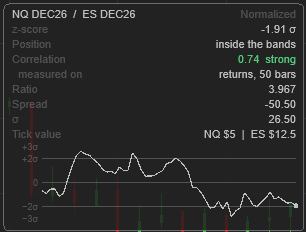
A panel in the top right corner of the price chart, for the bar the chart is scrolled to. The first line names the instruments and the calculation mode. Until it is ready, it says what is missing - the second (or third) instrument, or how many bars it still needs.
| Row | What it shows |
|---|---|
| z-score | How many σ the spread is from its mean; orange beyond Band width. |
| Position | Above the upper band, below the lower band, or inside the bands. |
| Correlation | The correlation of the instruments and how strong it is: green from 0.7, yellow from 0.4, orange below. Measured on - returns or prices, and over how many bars. |
| Ratio | The ratio the second leg is weighted by (custom if you set it); Synthetic with three legs. |
| Spread, Mean ± σ | The spread's current value, its mean and standard deviation; depending on the mode only σ, or the distance From mean. |
| Tick value | What one tick of each leg is worth. |
Below them, a small chart of the z-score over the last HUD bars bars, with the zero line and the two band lines; the last point turns orange beyond a band.
Version history
v.2.3.5.0 - October 2026
- New: z-score, correlation, bands, a third leg and a HUD; the second instrument picked from the list.
- Fixed: the normalized ratio.
- Changed: the HUD kept clear of the arrow on the price scale.