General & Orders
General properties holds the trade direction and a switch for each core feature - switch a feature on and its group appears. Orders sets how entries and the strategy's own exits are placed.
General properties
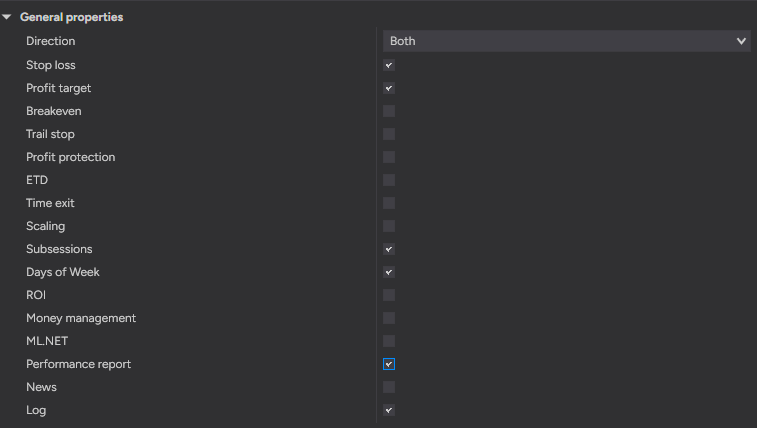
| Parameter | Default | What it does |
| Direction | Both | Which entries the strategy may take: both, long only or short only. Open positions are not affected. |
| Stop loss | On | Protect every position with a stop order, as set in the Stop loss group. Off: no stop is placed. |
| Profit target | On | Place a profit target with every position, as set in the Profit target group. Off: no target. |
| Breakeven | Off | Move the stop to the entry (or slightly past it) once the trade reaches the profit set in the Breakeven group. |
| Trail stop | Off | Move the stop after the price, as set in the Trail stop group. The stop is never loosened. |
| Profit protection | Off | Close a position that came close to its target and then turned back. Needs a profit target. |
| ETD | Off | End-trade drawdown: after the ETD trigger, close the trade when it gives back the set drawdown from its best price. |
| Time exit | Off | Close a position after the time set in the Time exit group, whatever its result. Off: the group is hidden. |
| Scaling | Off | Add to an open position as set in the Scaling group. Off: no adds. |
| Subsessions | Off | Trade only inside the windows of the Subsessions group. Off: the whole trading session is traded. |
| Days of Week | Off | Trade only on the days chosen in the Days of Week group (Sunday evening counts as Monday). Off: every day is traded. |
| ROI | Off | Close a position by how long it has been open and what it has made by then (up to three levels). |
| Money management | Off | Stop the strategy on its daily, weekly or monthly result, as set in the Money management group. Off: no money limits. |
| ML.NET | Off | Filter every signal through the MLEngine indicator. Off: every signal is traded. |
| Performance report | Off | Print performance statistics to Output 2 at the end of each period and of the historical run. Off: the group is hidden. |
| News | Off | No entries around the events of the shared news calendar; optionally close positions before them. Off: news are ignored. |
| Log | On | Keep the strategy's log, as set in the Log group. Off: only errors and the final summary are printed. |
Orders
| Entry type | Fills |
| Market | at once |
| Limit | at Entry price or better - waits for a pullback |
| Stop market / Stop limit | once the price breaks through Entry price |
| MIT | at market as soon as the price touches Entry price |
| Parameter | Default | What it does |
| Entry type | Market | Order type of the entry. Market: fills at once. Limit: waits for a better price. StopMarket / StopLimit: wait for a breakout. MIT: goes at market when the price touches the level. |
| Entry price | Close | Price a non-market entry is placed from: the strategy's own level or a price of the last closed bar. |
| Entry offset (ticks) | 0 | Distance from Entry price, toward a better fill. 0 = at Entry price. |
| Stop limit offset (ticks) | 2 | StopLimit: how far past the stop price the limit sits. 0 = at the stop price. |
| Exit type | Market | Order type of the strategy's own exits. Market: at once. Limit: at Exit price, switched to market after Exit lifetime. |
| Exit price | Close | Which price of the last closed bar of the chart a limit exit is placed from. |
| Exit offset (ticks) | 0 | How far from Exit price the limit exit is placed, towards a better fill: above it when a long is sold, below it when a short is bought back. 0 = exactly at Exit price. |
| Time unit | Bars | Unit of Entry and Exit lifetime: chart bars or seconds. |
| Entry lifetime (bars) | 0 | Cancel a limit or stop entry not filled within this many bars. 0 = off. |
| Entry lifetime (s) | 0 | The same as Entry lifetime (bars), counted in seconds of market time. 0 = off. |
| Exit lifetime (bars) | 1 | Replace a limit exit not filled within this many bars with a market order. 0 = off. |
| Exit lifetime (s) | 30 | The same as Exit lifetime (bars), counted in seconds of market time. 0 = off. |
| Chase (ticks) | 0 | Move an unfilled limit entry after the price, keeping it this many ticks away. 0 = off. |
| Chase max (ticks) | 8 | Furthest a chased limit may move from its first price. 0 = no limit. |
| Entry retries | 3 | How many times a refused entry order is resent. 0 = never. |
| Exit retries | 3 | How many times a refused stop or target is resent before the position is closed or left on its stop. |
| Order series | Chart bars | Series the orders are filled on. Tick: precise fills, slower to load. |