Money & News
Money management stops the strategy for the rest of the day, week or month once its own result reaches a profit or loss limit. News pauses entries around the events of a shared news calendar and can close positions before them.
Money management
| Parameter | Default | What it does |
|---|---|---|
| Calculation type | Currency | Unit of the limits in this group: account currency, or percent of the account value at the start of the period. |
| Enable Daily Profit | Off | Stop taking entries once the strategy's own result for the trading day reaches Daily profit. |
| Daily profit | 1000 | Day's profit at which the strategy stops, counted from its own trades. 0 = off. |
| Enable Daily Loss | Off | Stop taking entries once the strategy's own loss for the trading day reaches Daily loss. |
| Daily loss | 1000 | Day's loss (a positive number) at which the strategy stops, counted from its own trades. 0 = off. |
| Enable Weekly Profit | Off | Stop taking entries for the rest of the week once the week's result reaches Weekly profit. |
| Weekly profit | 3000 | The week's profit at which the strategy stops, in the unit of Calculation type. It counts only what this run has traded since it started. 0 = off. |
| Enable Weekly Loss | Off | Stop taking entries for the rest of the week once the strategy's own loss for it reaches Weekly loss. |
| Weekly loss | 3000 | Week's loss (a positive number) at which the strategy stops. 0 = off. |
| Enable Monthly Profit | Off | Stop taking entries for the rest of the month once the strategy's own result for it reaches Monthly profit. The month is the calendar month of the exchange trading day. |
| Monthly profit | 10000 | The month's profit at which the strategy stops, in the unit of Calculation type. It counts only what this run has traded since it started. 0 = off. |
| Enable Monthly Loss | Off | Stop taking entries for the rest of the month once the strategy's own loss for it reaches Monthly loss. |
| Monthly loss | 10000 | Month's loss (a positive number) at which the strategy stops. 0 = off. |
| Use high-watermark | Off | Stop for the day, week or month once it gives back too much of its best result. Each period has its own settings below. |
| HW day trigger | 500 | Profit the day must reach before its high-watermark applies. 0 = off. |
| HW day drawdown | 250 | How much the day may give back from its best result before the strategy stops. 0 = off. |
| HW week trigger | 1500 | The profit the week must reach, in the unit of Calculation type, before its high-watermark starts to matter. The week keeps its own best across its days. 0 = off. |
| HW week drawdown | 750 | How much the week may give back from its best result before the strategy stops. 0 = off. |
| HW month trigger | 5000 | The profit the month must reach, in the unit of Calculation type, before its high-watermark starts to matter. The month keeps its own best across its weeks. 0 = off. |
| HW month drawdown | 2500 | How much of its best the armed month may give back before it stops, in the unit of Calculation type. Measured from the best the month has been. 0 = off. |
| On limit | Block entries | What happens when a limit is reached. BlockEntries: no new entries. BlockAndClose: the open position is also closed at market. |
News
The news are kept in one calendar shared by all the pack's strategies - edit it once, every strategy uses it. In a strategy's settings press ... next to Events: the News calendar window opens (x clears the calendar).
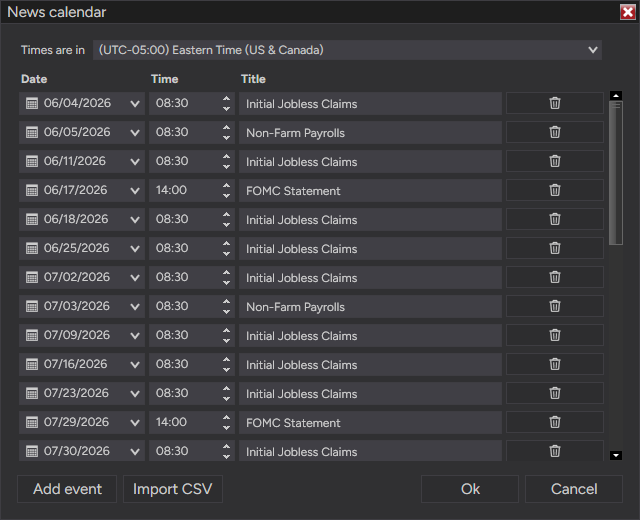
| In the window | What it does |
|---|---|
| Times are in | The time zone the calendar's times are written in - Eastern by default, as published calendars use. Strategies convert them to the time zone of their chart. |
| Date / Time / Title | One row per event. |
| Add event | A new row. |
| Import CSV | Adds the events of a CSV or TXT file to the list. |
| Ok | Saves the calendar. |
Events are dated: nothing repeats by itself - keep the calendar current, for example by importing the week's events.
CSV format - one event per line: date,time,title (a comma, semicolon or tab between them), in the time zone chosen in the window:
Dates: yyyy-MM-dd (also yyyy.MM.dd, yyyy/MM/dd, MM/dd/yyyy, dd.MM.yyyy). Times: HH:mm (also HH:mm:ss, h:mm AM). Lines that are not a date and a time are skipped and counted.
| Parameter | Default | What it does |
|---|---|---|
| Events | — | The news calendar, shared by all ASF strategies. Press ... to edit it, x to clear it. Times are converted to the chart's time zone. |
| Minutes before | 5 | No new entries from this many minutes before a news event. |
| Minutes after | 5 | No new entries until this many minutes after a news event. |
| Exit before news | Off | Close an open position at market Seconds before a news event. Off: the position keeps its stop and target. |
| Seconds | 60 | How many seconds before a news event the position is closed. |