


ASF Pack v.3.0.0.0 is out – the biggest step yet in machine learning for NinjaTrader 8: every automated strategy now runs on one shared core with the ML Engine built in, the whole pack installs from a single archive, and indicators, AddOns and share services have been reworked from the ground up.
Here is what is new and how to update.
Machine learning at the heart of the pack
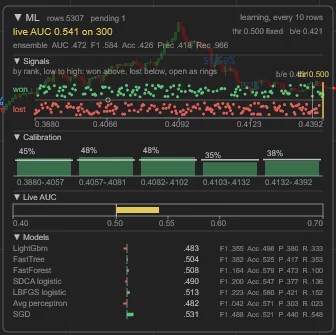
The ML Engine is an ensemble of models that learns from the market which signals tend to work. Every new signal gets a probability, weak ones are filtered out, and inside a strategy the engine can also forecast the position size from the strategy’s own trades.
- In every strategy – the ML Engine is one switch in the strategy’s settings.
- On your chart – as an indicator, it scores the signals of any indicator you use.
- See how it is doing – the ML panel shows the live AUC, calibration, the recent signals and each model of the ensemble, so you can tell at a glance whether the filter is earning its place.
One core for every strategy

Every automated strategy now runs on the Strategy Core, so they all share the same, thoroughly tested trade management:
- Stop loss and up to three profit targets, breakeven, trailing stop and profit protection
- Scaling and position sizing by risk or by account
- Three daily trading windows, days of the week and time exits
- Daily, weekly and monthly account limits
- News pauses from one shared news calendar
- A performance report and the ML Engine filter

Learn the settings once and they work the same in every strategy. Each strategy’s page in the guide lists only its own signal settings. ATM strategies run on the ATM Core, and the arbitrage strategy on the Arbitrage Core.
Every strategy was reviewed: its signal checked against the previous version, new options added where they help (signal confirmation, filters), and the defaults set for current markets.
New strategy: ATM Iceberg – scalping off iceberg orders found in the order book.
Indicators

- New: SR Zones – support and resistance zones from swing pivots, confirmed by bounces.
- All indicators now draw on the chart directly: no drawing objects left behind, fast on long histories, and the same result in history and in real time.
- Visual updates across the board – Bar Analyzer with its statistics card, Trade Performance, True Trend, Destination Bars, Grid Meister and more.
AddOns and share services
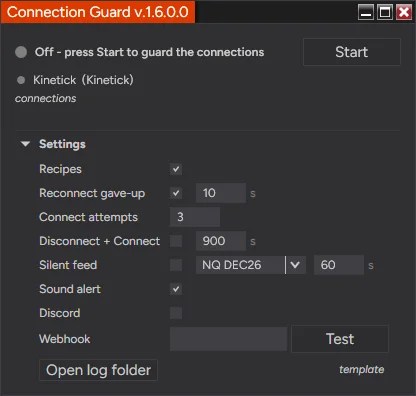
- New: Connection Guard – keeps NinjaTrader’s connections alive for your running strategies and alerts you when something needs your attention.
- New: Telegram share service – chart screenshots, alerts and strategy messages to a chat, group or channel through your own bot. Discord and Slack were updated as well.
- Trading Clock and Templates Manager updated.
One archive, one import

The whole pack now comes as a single ASFPack archive: indicators, strategies, AddOns and tools in one import, with no import order to follow and one entry to remove.
A new guide
The ASF Pack Guide has been rewritten for v.3: a page for every product with its settings, what it needs and its version history, plus a chapter on each part of the Strategy Core. Hover a core setting for a short explanation.
How to update
- Make sure you run NinjaTrader 8.1.8.3 (64-bit) or newer.
- Download the new archive from your member account.
- Remove the installed version: Control Center → Tools → Remove NinjaScript Assembly → ASFPack, then restart NinjaTrader.
- Import the new archive: Control Center → Tools → Import → NinjaScript Add-On, then restart NinjaTrader.
Order-flow features – delta, Volumetric bars and the ML Engine’s order-flow inputs – need a NinjaTrader Order Flow+ subscription; each product’s page in the guide lists what it needs. The full list of changes is in the release notes.
Try it
New to ASF Pack? Start with the 14-day free trial and test every tool before you subscribe. Questions or ideas for the next update? Get in touch – many of our tools started as a member’s suggestion.
Trading futures and forex involves substantial risk of loss and is not suitable for every investor. Past performance, whether actual or hypothetical, is not indicative of future results.
